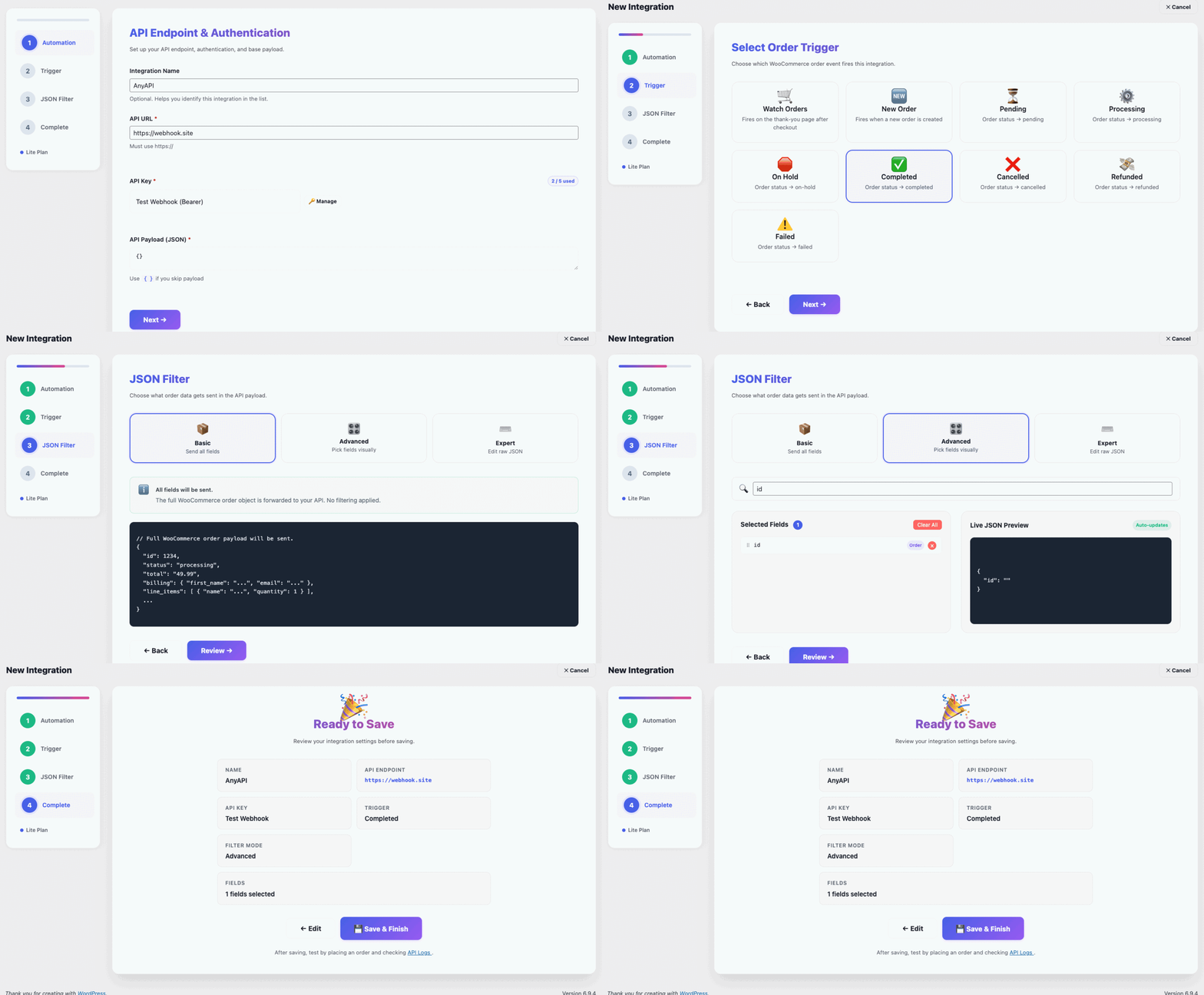
AnyAPI is the easiest WooCommerce API integration plugin for WordPress. Connect your store to any REST API or webhook in minutes without writing a single line of code.
In short, AnyAPI handles the hard parts so you can focus on running your store.
Powerful WooCommerce API Integration for your business
First of all, AnyAPI gives you a clean, responsive dashboard that guides you through the entire WooCommerce API integration process. In other words, you do not need to touch any code or leave your WordPress admin. Furthermore, every setting uses plain language — not developer jargon.
In many cases, WooCommerce stores send bloated JSON data to external APIs. However, AnyAPI solves this with a built-in JSON Filter that lets you pick exactly which order fields to include. Consequently, your API receives only the data it needs — and as a result, you never write a single line of PHP or JavaScript.
Above all, you need to know whether your WooCommerce API integration actually sent the data. Therefore, AnyAPI logs every API request and response in your WordPress dashboard. As a result, you can instantly see status codes, latency, and error details. In addition, Lite users unlock log search, date filters, and success-rate statistics for full observability.
In fact, AnyAPI connects your WooCommerce orders to the tools you already use.
For instance, trigger a Slack or LINE message every time a customer completes a purchase. As a result, AnyAPI sends the order data to your messaging API automatically.
Similarly, push WooCommerce order details to SAP, NetSuite, ShipStation, or any custom ERP endpoint. Consequently, AnyAPI handles the REST API call so your warehouse stays in sync.
In addition, send customer and order data to HubSpot, Salesforce, Pipedrive, or any CRM with a REST API. Best of all, no Zapier subscription is required.
Also, connect WooCommerce to Google Sheets, Airtable, Make, or thousands of other services that accept webhook payloads. Furthermore, AnyAPI delivers the data in real time.
In other words, AnyAPI connects WooCommerce to thousands of platforms — so if it has a REST API, AnyAPI can send your order data there.
Simply pick the plan that fits your store. Moreover, you can upgrade anytime as your needs grow.
Want to know more about AnyAPI, get onboard
Essentially, AnyAPI is a WordPress plugin that makes WooCommerce API integration simple. More specifically, it connects your WooCommerce store to any external REST API — so when an order event happens, AnyAPI automatically sends the data to your chosen endpoint. Best of all, you do not need any coding skills to set it up.
No. In fact, AnyAPI targets non-technical WooCommerce store owners specifically. For example, the visual dashboard, payload builder, and JSON Filter let you configure your entire WooCommerce API integration without writing PHP, JavaScript, or any other code. However, developers can also use AnyAPI to save time on repetitive integration work.
Zapier and Make charge monthly fees based on task volume — costs add up quickly for busy WooCommerce stores. In contrast, AnyAPI runs entirely inside your WordPress dashboard with a flat annual fee. As a result, your order data stays on your own server, and you avoid per-task pricing. Furthermore, AnyAPI includes a built-in JSON Filter and API Logs that Zapier does not offer natively.
Yes. Specifically, AnyAPI works with any service that accepts REST API or webhook requests. For instance, store owners use AnyAPI to push order data to Slack, LINE, WhatsApp Business API, HubSpot, Salesforce, ShipStation, QuickBooks, SAP, Google Sheets, and many more. In short, if the platform has an API endpoint, AnyAPI can send your WooCommerce data there.

For help setting up and configuring AnyAPI, please visit Documentation
In fact, hundreds of store owners already use AnyAPI for WooCommerce API integration. So download the free plugin and connect your first API in under 5 minutes.
© Copyright 2025・AnyAPI・All rights reserved