
Feature Comparison
Choosing the right AnyAPI plan depends on how many integrations you need and how much control you want over your API workflow. To help you decide, this feature comparison guide breaks down every plan side by side so you can pick the best fit for your WooCommerce store.
AnyAPI offers four tiers: Starter (free forever), Lite, Plus, and Agency. Importantly, each tier builds on the previous one, so you never lose access to features when you upgrade.
Plans at a Glance — Full Feature Comparison
The following table provides a quick feature comparison across all four AnyAPI plans:
| Feature | Starter (Free) | Lite — $79/yr | Plus — $149/yr | Agency — $299/yr |
|---|---|---|---|---|
| Order API Integration | ✓ | ✓ | ✓ | ✓ |
| Monthly API Calls | Unlimited (throttled after 500) | Unlimited | Unlimited | Unlimited |
| Order Triggers | 3 triggers | All 9 triggers | All 9 triggers | All 9 triggers |
| Email Order Notifications | 1 | Unlimited | Unlimited | Unlimited |
| API Keys | 1 | 5 | 20 | Unlimited |
| Real-time API Log | Last 10 entries (read-only) | Full log with search | Full log with search | Full log with search |
| Log Search & Statistics | ✗ | ✓ | ✓ | ✓ |
| JSON Filter (Advanced/Expert) | ✗ | ✓ | ✓ | ✓ |
| WC REST API Tester | ✓ | ✓ | ✓ | ✓ |
| Integration Templates | 1 templates | Coming Soon | Coming Soon | Coming Soon |
| Webhook Receiver (Inbound) | ✗ | ✗ | ✓ | ✓ |
| Sites per License | 1 | 1 | 3 | Unlimited |
| Support | Community | Priority | Dedicated |
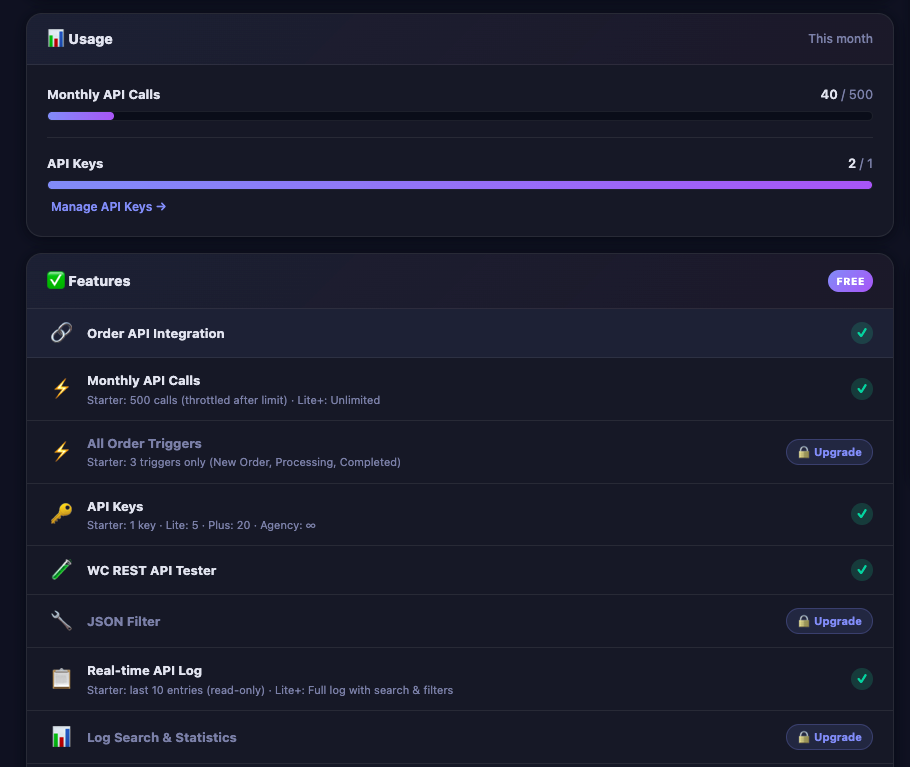
Note: All plans include the core Order API Integration and the built-in WC REST API Tester. In other words, every AnyAPI user can connect WooCommerce orders to external APIs from day one.
Starter — Free Forever
The Starter plan lets store owners try AnyAPI without any commitment. Essentially, it includes everything you need to set up your first integration and verify that it works.
What You Get
To begin with, Starter gives you one API key, three order triggers, and unlimited API calls. Specifically, the three available triggers are:
- New Order — for instance, this fires when an order is placed (status: pending)
- Processing Order — fires when WooCommerce confirms payment
- Completed Order — similarly, this fires when you mark the order as complete
In addition, Starter includes a real-time API log that shows your last 10 outgoing calls. As a result, you can immediately confirm whether your API requests are succeeding or failing.
Additionally, Starter lets you set up one email order notification. Specifically, AnyAPI sends a fixed-format order summary — including line items, totals, and shipping details — straight to any inbox you choose, with no API key or external service required.
What Is Throttled
However, after 500 API calls per month, Starter does not stop sending requests. Instead, it adds a short delay between calls. Therefore, your integrations continue working, but at a reduced speed. After that, once the new calendar month begins, the counter resets automatically.
Tip: If you completed the Quick Start guide, you are already using the Starter plan. From here, you can evaluate whether the free tier meets your needs before upgrading.
Lite — $79/year
In contrast, Lite is the most popular plan for store owners who need more than one integration or want full visibility into their API activity. In short, it unlocks the features that matter most for day-to-day operations.
Key Upgrades from Starter
First, Lite unlocks all 9 order triggers. As a result, you can send API calls for every WooCommerce order status, including on-hold, cancelled, refunded, and failed orders. Consequently, you have complete control over which events trigger your integrations.
Second, Lite gives you 5 API keys. For example, you can store separate credentials for Slack, WhatsApp, your ERP system, and two staging environments — all without hitting a limit.
Third, Lite enables the full API log experience. Specifically, you gain access to log search, date filters, and status statistics (2xx / 4xx / 5xx counts). As a result, these tools make troubleshooting significantly faster.
Fourth, Lite removes the one-notification cap on email order alerts. Therefore, you can set up as many email destinations as you need — for example, one for your fulfillment team and another for accounting.
Finally, Lite unlocks JSON Filter mode. With Advanced and Expert filter modes, you can customize exactly which order fields AnyAPI includes in your API payload. For a detailed explanation, see the JSON Filter Mode guide.
In particular, Advanced mode also supports nested fields — for instance, you can extract product names and quantities from every item inside line_items, not just top-level order data.
Who Should Choose Lite
Overall, Lite is the right choice if any of the following apply:
- First, you connect to more than one external API
- Second, you need triggers beyond the three Starter triggers
- Third, you want to search and filter your API logs
- Finally, you need to customize your JSON payload structure
Plus — $149/year
Furthermore, Plus builds on Lite by adding inbound webhook support, more API keys, and multi-site licensing. Accordingly, it targets stores with complex integration needs.
Key Upgrades from Lite
In addition to everything in Lite, Plus includes:
- 20 API keys — enough for large integration ecosystems with multiple staging and production endpoints
- All integration templates — pre-built configurations for popular services, so you spend less time on setup
- Webhook Receiver — accept inbound webhooks from external APIs, not just send outbound calls. As a result, you can build two-way integrations
- 3 sites per license — use the same license on up to 3 WordPress installations (for instance, production, staging, and development)
Who Should Choose Plus
Overall, Plus is the right choice if any of the following apply:
- First, you need to receive inbound webhooks from external services
- Second, you manage multiple WooCommerce sites under one license
- Third, you connect to many APIs and need more than 5 key slots
- Finally, you want access to all pre-built integration templates
Agency — $299/year
Lastly, Agency targets developers and agencies managing client stores. Above all, it removes all numerical limits and provides dedicated support.
Key Upgrades from Plus
Furthermore, Agency includes:
- Unlimited API keys — no cap on stored credentials
- Unlimited sites — activate on as many client installations as you need
- Dedicated support — direct access to the development team for technical issues
Who Should Choose Agency
Overall, Agency is the right choice if you manage WooCommerce stores for multiple clients and need a single license that covers all of them. In particular, freelancers and agencies benefit from the unlimited site activations.
Feature Comparison by Use Case
The table above covers features, but in practice, choosing a plan is easier when you think about your specific situation. Below, the following scenarios map common use cases to the recommended plan:
| Use Case | Recommended Plan | Why |
|---|---|---|
| Testing AnyAPI for the first time | Starter (Free) | No cost, includes core features |
| Single store, one API (e.g., Slack notifications) | Starter or Lite | Starter works if you only need 1 trigger type |
| Single store, multiple APIs (e.g., Slack + ERP) | Lite | Multiple API keys + all triggers |
| Store with complex payload customization | Lite | JSON Filter (Advanced/Expert mode) |
| Two-way integration (send + receive) | Plus | Webhook Receiver required |
| Production + staging on separate domains | Plus | 3 sites per license |
| Agency managing 5+ client stores | Agency | Unlimited sites + dedicated support |
Still unsure? Start with the free Starter plan. You can upgrade at any time without losing your existing integrations or settings. In fact, all your configurations carry over automatically when you activate a paid license.
How to Upgrade
In practice, upgrading from Starter to a paid plan takes just a few steps:
- First, visit the AnyAPI Pricing page and choose your plan.
- Then, complete your purchase. You will receive a license key by email.
- Next, install the AnyAPI Lite (or Plus/Agency) plugin on your WordPress site. For detailed instructions, see the Activate Your License guide.
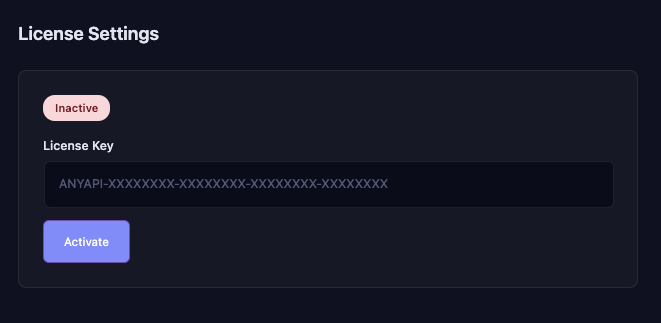
- Finally, enter your license key in AnyAPI → License and click Activate.
After activation, all locked features unlock immediately. As a result, you do not need to reconfigure your existing integrations.
Feature Comparison FAQ
Can I switch plans later?
Yes. Of course, you can upgrade or downgrade at any time. If you upgrade, AnyAPI prorates the price difference. Conversely, if you downgrade, the system locks your higher-tier features until you renew at the higher plan.
What happens when my license expires?
When your paid license expires, AnyAPI automatically falls back to Starter-level limits. Specifically, your triggers reduce to 3, your API log switches to the last-10 read-only view, and the system disables JSON Filter mode. However, your saved integrations and API keys remain intact. Once you renew, everything unlocks again.
Do I lose my settings if I upgrade?
No. In fact, AnyAPI keeps all your integrations, API keys, and log history intact. Upgrading only unlocks additional features. Similarly, downgrading only locks premium features without deleting your data.
Is there a free trial for paid plans?
AnyAPI does not offer a time-limited trial. Instead, the Starter plan itself serves as a permanent free tier. As such, you can use it for as long as you need before deciding to upgrade.
Next Steps
Now that you have reviewed this feature comparison, here is what to do next:
- Get started for free — install AnyAPI from WordPress.org and follow the Quick Start guide.
- Upgrade your plan — visit the AnyAPI Pricing page to unlock more features.
- Learn about API keys — if you need to store credentials, see the API Key Management guide.
- Set up your integration — follow the Order API Integration guide for a complete walkthrough.